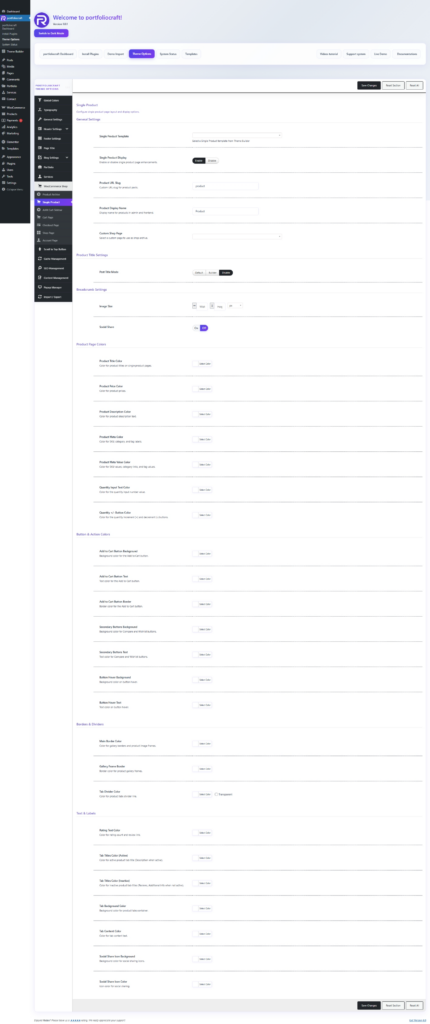
The Single Product options control the layout, template, and styling of WooCommerce product pages in your theme. These settings let you choose a Theme Builder template and fine‑tune colors, texts, and buttons for all products at once.
General settings #
- Single Product Template
- Single Product Display
- Product URL Slug
- Product Display Name
- Custom Shop Page
Product title and breadcrumbs #
- Post Title Mode
- Breadcrumb Settings
Product page colors #
These options apply to the single product page only and let you match the shop with your brand colors.
- Product Title Color – Color of the main product name.
- Product Price Color – Color of the price (regular and sale).
- Product Description Color – Color of short/long description text.
- Product Meta Color – Color for labels such as “SKU”, “Category”, “Tags”.
- Product Meta Value Color – Color for the actual values and links (SKU codes, category links, tag links).
- Quantity Input Text Color – Color of the quantity input number.
- Quantity +/- Button Color – Color of the plus/minus controls on the quantity field.
Use these to ensure good contrast and a clear visual hierarchy for key product information.
Buttons & actions #
- Add to Cart Button Background / Text / Border
- Secondary Buttons Background / Text
- Button Hover Background / Text
Borders & dividers #
- Main Border Color – General border color for product content blocks and image frames.
- Gallery Frame Border – Specific border color around the product gallery images.
- Tab Divider Color – Color of the divider line between product tabs (Description, Additional information, Reviews).
These help visually separate sections and keep the layout tidy.
Text, tabs, and social share #
- Rating Text Color – Color for rating count and “X reviews” link.
- Tab Titles Color (Active) – Color for the active product tab label.
- Tab Titles Color (Inactive) – Color for inactive tab labels.
- Tab Background Color – Background behind the product tabs area.
- Tab Content Color – Text color inside the tab content (description, specs, reviews).
- Social Share
- Toggles social sharing icons on the single product page (e.g. Facebook, X/Twitter, Pinterest).
- Social Share Icon Background – Background color for each social icon.
- Social Share Icon Color – Icon color itself. These options allow you to match share icons with your design while keeping them visible and clickable.
With these controls, the Single Product panel lets you assign a Theme Builder template and then globally style titles, prices, metadata, buttons, borders, tabs, and social icons across all WooCommerce product pages.