
Skip to content

Need Support?

Discover Themes

Need Support?

Discover Themes

Need Support?

Discover Themes

Getting Started

7
  • Theme Updates
  • Installing Required Plugins
  • Install Using FTP
  • Theme Installation & Activation
  • What We Offer (Downloaded Packages)
  • WordPress Installation
  • Server Requirements

Site Setup

4
  • Turn on Coming Soon / Maintenance Mode (Elementor)
  • Adding Coustom 404 Page
  • Customizing Your Menu
  • Adding a Favicon to your Site

Theme Options

16
  • Account Page 
  • Shop Page
  • Checkout Page
  •  Cart Page 
  •  AJAX Cart Sidebar
  • Single Product
  • Product Archive
  • Content Management
  • SEO Management
  • Cache Management
  • Back To Top
  • Typography & Custom Fonts
  • Back To Top (Scroll to Top Button)
  • Cursor / Mouse Movement Animation
  • Change Global Color
  • Enable Dark or Light Mode in Rakmyat Themes

Theme Builder

7
  • Single Product
  • Product Archive
  • Mega Menu 
  • Adding Coustom 404 Page
  • Template Builder
  • Footer 
  • Header Template

Portfolio

4
  • Creating a Single Portfolio Item
  • Creating a Portfolio Archive Page
  • Portfolio Display Name
  • Change Portfolio Slug

Services

4
  • Services Display Name
  •  Creating a Single Service
  •  Creating a Services Archive Page
  • Change Services Slug

WooCommerce Shop

7
  • Account Page 
  • Shop Page
  • Checkout Page
  •  Cart Page 
  •  AJAX Cart Sidebar
  • Single Product
  • Product Archive

How to

5
  • How to Give Access to Your WordPress Website
  • Change Global Color
  • Enable Dark or Light Mode in Rakmyat Themes
  • Adding Coustom 404 Page
  • Turn on Coming Soon / Maintenance Mode (Elementor)

Troubleshooting

5
  • Elementor Not Loading – Troubleshooting Guide
  • Demo Import Failed to Import in WordPress Theme
  • How to Fix the “Critical Error on Your Website”
  • WPML Not Detecting Custom Post Types
  • System Status

Demo Import

4
  • Demo Import Failed to Import in WordPress Theme
  • Manual Demo Import (OCDI + Elementor)
  • Importing Demo Locally from Theme Folder
  • Importing Demo (Default Method via Server HTTP Request)

Full Site Editing

9
  • Single Product
  • Product Archive
  • Adding Coustom 404 Page
  •  Creating a Services Archive Page
  •  Creating a Single Service
  • Creating a Portfolio Archive Page
  • Creating a Single Portfolio Item
  • Footer 
  • Header Template
View Categories
  • Home
  • Docs
  • Theme Options
  • SEO Management

SEO Management

2 min read

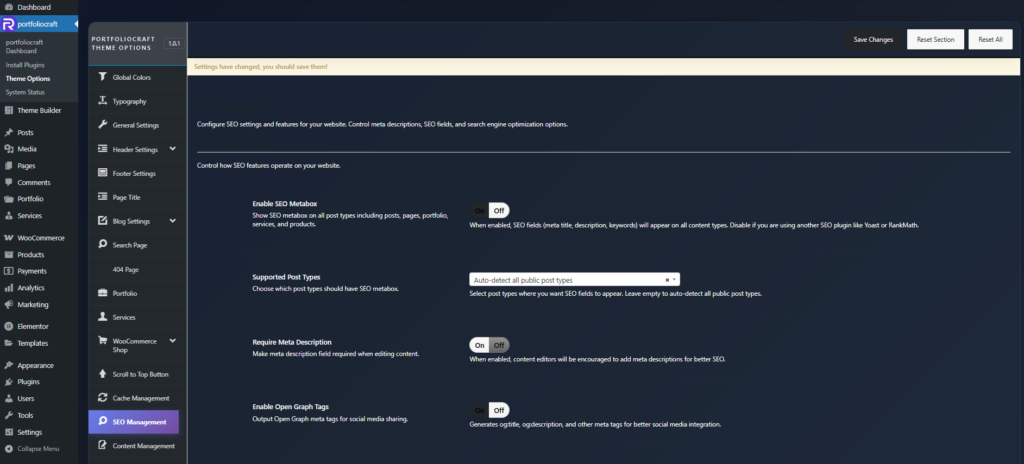
The SEO Management options in Theme Options provide a built‑in SEO system for meta tags and social sharing, so you can manage titles, descriptions, and robots settings directly from the theme or disable them when using a dedicated SEO plugin.​


Location and purpose #

  • Location: Rakmyat Dashboard → Theme Options → SEO Management.
  • Purpose: Control global SEO behavior (where SEO fields appear, whether Open Graph/Twitter tags are output, and how strict meta descriptions are) and expose an SEO metabox on supported post types.​

SEO System Settings (Theme Options) #

Enable SEO Metabox #

  • Shows the SEO Settings metabox on all supported post types (posts, pages, portfolio, services, products, etc.).
  • Disable this if you are using another SEO plugin such as Yoast, Rank Math, SEOPress, etc., to avoid duplicate meta tags and overlapping interfaces.​

Supported Post Types #

  • Options:
    • Auto-detect all public post types
    • Posts only
    • Pages only
    • Posts, Pages + Custom Post Types
  • Choose where the SEO metabox should appear. If left to auto‑detect, it will attach to all public post types registered on the site (useful when working with custom post types like portfolio or services).​

Require Meta Description #

  • When enabled, the Meta Description field is treated as required during content editing.
  • This encourages editors to write descriptions for every important page, which helps click‑through rate and snippet quality in search results (ideal length around 140–160 characters).​

Enable Open Graph Tags #

  • Outputs Open Graph meta tags such as og:title, og:description, and optionally og:image into the page <head>.
  • These tags control how your page appears when shared on platforms like Facebook, LinkedIn, and other social networks.​

Enable Twitter Cards #

  • Outputs Twitter (X) Card meta tags such as twitter:title, twitter:description, and twitter:image.
  • Ensures your content shows a proper preview when shared on Twitter/X, similar to Open Graph for other platforms
    ​

SEO Settings metabox (Edit Post/Page) #

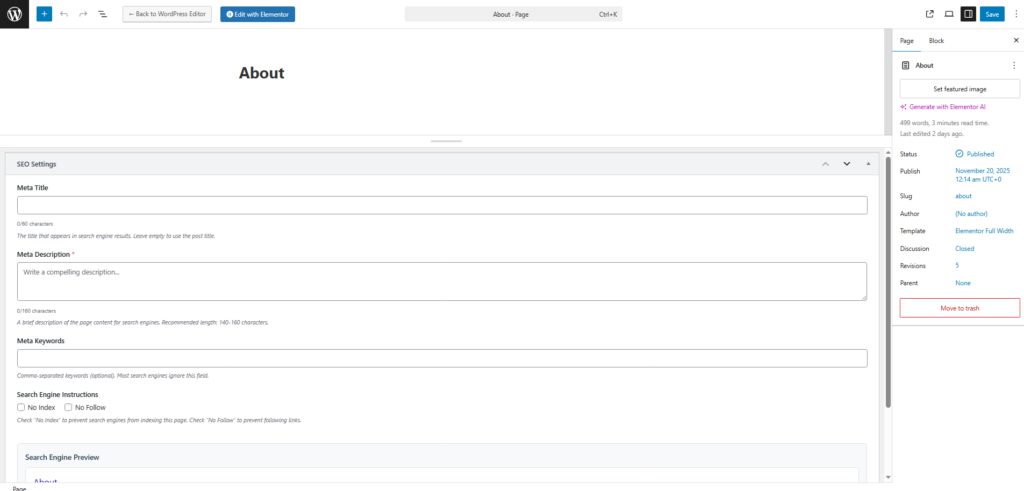
When the SEO system is enabled for a post type, an SEO Settings panel appears in the editor.

Meta Title #

  • A custom title tag for search engines, separate from the on‑page heading.
  • Recommended length: about 50–60 characters so it does not get truncated in search results.​
  • If left empty, the theme falls back to the post or page title.

Meta Description #

  • Short summary of the page content shown in search snippets.
  • Recommended length: roughly 140–160 characters; long enough to describe value but short enough not to be cut off.​
  • Marked with * when Require Meta Description is active, reminding editors to fill it for better SEO.

Meta Keywords #

  • Comma‑separated keywords.
  • Most modern search engines ignore this tag, but it can still be used for internal organization or legacy tools if needed.
Search Engine Instructions (Robots) #

  • No Index: Prevents search engines from indexing this specific page (useful for thank‑you pages, internal landing pages, etc.).
  • No Follow: Prevents search engines from following links on this page, which can be useful on low‑value or experimental pages.​

Search Engine Preview #

  • Shows a live preview of how the page might appear in search results:
    • Title (using Meta Title or post title).
    • URL.
    • Meta Description text if set, or a notice prompting you to add one.
  • Helps editors visually optimize metadata before publishing.​

When to use this vs external SEO plugins #

  • Use Theme SEO Management if you want a simple, lightweight SEO layer with custom titles, descriptions, and basic social tags.
  • If you install a full SEO suite (Yoast, Rank Math, SEOPress, etc.), disable Enable SEO Metabox and social tag options to avoid duplicate meta tags and conflicting rules.​
Updated on December 16, 2025

What are your Feelings

  • Happy
  • Normal
  • Sad

Share This Article :

  • Facebook
  • X
  • LinkedIn
  • Pinterest
Cache ManagementContent Management

Leave a Comment Cancel Reply

Your email address will not be published. Required fields are marked *

Table of Contents
  • Location and purpose
  • SEO System Settings (Theme Options)
  • Enable SEO Metabox
  • Supported Post Types
  • Require Meta Description
  • Enable Open Graph Tags
  • Enable Twitter Cards
  • SEO Settings metabox (Edit Post/Page)
  • Meta Title
  • Meta Description
  • Meta Keywords
  • Search Engine Instructions (Robots)
  • Search Engine Preview
  • When to use this vs external SEO plugins

We design modern, performance‑focused WordPress themes that give you full control over your website – from visual identity to conversion‑driven layouts.

Helpful resources

  • Getting Started
  • How to
  • Site Setup
  • Theme Options
  • Theme Builder
  • Demo Import

Need help?

Our support team is here to assist with setup, customization questions, and technical issues. Open a support ticket any time and we’ll get back to you as soon as possible

Contact Us

Copyright © 2025 Rakmyat All Rights Reserved.