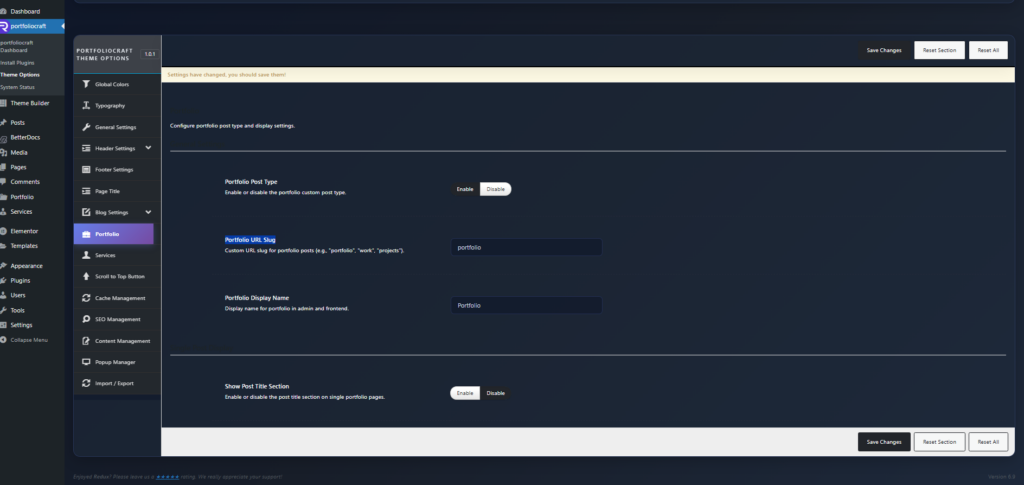
You can change the portfolio URL slug and display name from the Portfolio settings in Theme Options.
1. Open Portfolio Settings #
- Log in to your WordPress admin.
- Go to: Rakmyat Dashboard → Theme Options.
- In the left sidebar, click Portfolio.
Here you will see the Portfolio settings section.
2. Enable the Portfolio Post Type #
- Portfolio Post Type: make sure this is set to Enable.
If it is disabled, the portfolio custom post type and its URLs will not be available.
Click Save Changes if you changed this option.
3. Change the Portfolio URL Slug #
- Portfolio URL Slug: this controls the part of the URL used for single portfolio items.
Example values you can use:- portfolio
- work
- projects
- case-studies
Steps:
- In Portfolio URL Slug, enter your desired slug (only lowercase letters, numbers, and dashes).
- Click Save Changes at the top of the Theme Options page.
- Go to Settings → Permalinks in WordPress.
- Without changing anything, click Save Changes once.
This flushes permalinks so WordPress applies the new portfolio slug