Skip to content

Need Support?

Discover Themes

Need Support?

Discover Themes

Need Support?

Discover Themes

Getting Started

7
  • Theme Updates
  • Installing Required Plugins
  • Install Using FTP
  • Theme Installation & Activation
  • What We Offer (Downloaded Packages)
  • WordPress Installation
  • Server Requirements

Site Setup

4
  • Turn on Coming Soon / Maintenance Mode (Elementor)
  • Adding Coustom 404 Page
  • Customizing Your Menu
  • Adding a Favicon to your Site

Theme Options

16
  • Account Page 
  • Shop Page
  • Checkout Page
  •  Cart Page 
  •  AJAX Cart Sidebar
  • Single Product
  • Product Archive
  • Content Management
  • SEO Management
  • Cache Management
  • Back To Top
  • Typography & Custom Fonts
  • Back To Top (Scroll to Top Button)
  • Cursor / Mouse Movement Animation
  • Change Global Color
  • Enable Dark or Light Mode in Rakmyat Themes

Theme Builder

7
  • Single Product
  • Product Archive
  • Mega Menu 
  • Adding Coustom 404 Page
  • Template Builder
  • Footer 
  • Header Template

Portfolio

4
  • Creating a Single Portfolio Item
  • Creating a Portfolio Archive Page
  • Portfolio Display Name
  • Change Portfolio Slug

Services

4
  • Services Display Name
  •  Creating a Single Service
  •  Creating a Services Archive Page
  • Change Services Slug

WooCommerce Shop

7
  • Account Page 
  • Shop Page
  • Checkout Page
  •  Cart Page 
  •  AJAX Cart Sidebar
  • Single Product
  • Product Archive

How to

5
  • How to Give Access to Your WordPress Website
  • Change Global Color
  • Enable Dark or Light Mode in Rakmyat Themes
  • Adding Coustom 404 Page
  • Turn on Coming Soon / Maintenance Mode (Elementor)

Troubleshooting

5
  • Elementor Not Loading – Troubleshooting Guide
  • Demo Import Failed to Import in WordPress Theme
  • How to Fix the “Critical Error on Your Website”
  • WPML Not Detecting Custom Post Types
  • System Status

Demo Import

4
  • Demo Import Failed to Import in WordPress Theme
  • Manual Demo Import (OCDI + Elementor)
  • Importing Demo Locally from Theme Folder
  • Importing Demo (Default Method via Server HTTP Request)

Full Site Editing

9
  • Single Product
  • Product Archive
  • Adding Coustom 404 Page
  •  Creating a Services Archive Page
  •  Creating a Single Service
  • Creating a Portfolio Archive Page
  • Creating a Single Portfolio Item
  • Footer 
  • Header Template
View Categories
  • Home
  • Docs
  • Theme Options
  • Checkout Page

Checkout Page

2 min read

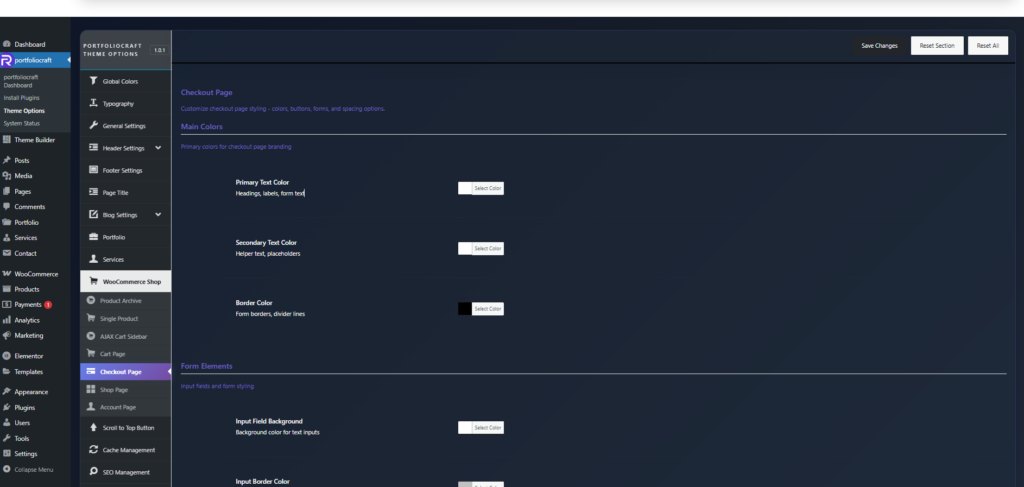
Main colors #

These control the overall text and border colors on the checkout page.

  • Primary Text Color
    Color for key text such as headings, field labels, and main form text (billing/shipping titles, etc.).​
  • Secondary Text Color
    Color for helper text, smaller labels, and placeholders, usually a softer shade than primary text.​
  • Border Color
    Color for form field borders and divider lines between sections, helping visually separate areas on the page.​

Form elements #

Style the checkout form inputs.

  • Input Field Background
    Background color of all text input fields (name, address, email, etc.).​
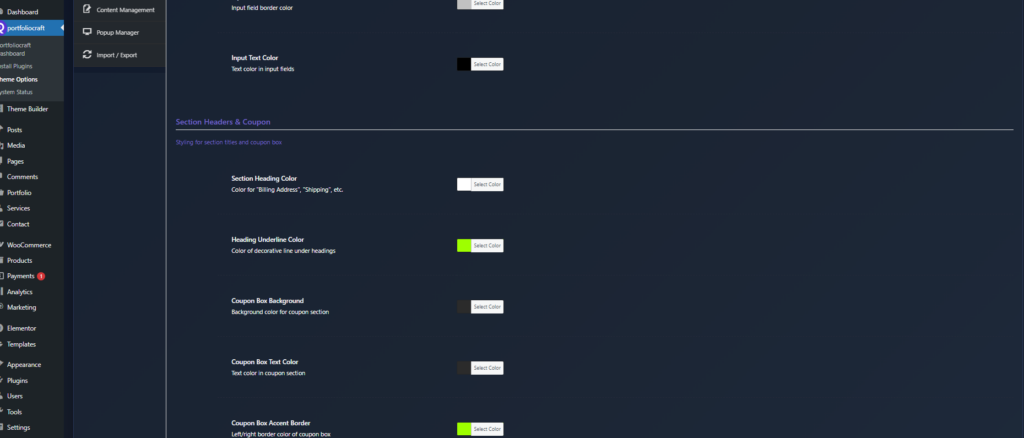
  • Input Border Color
    Border color for those fields; can be subtle or highly contrasted depending on your design.
  • Input Text Color
    Text color inside inputs so customer data remains easy to read.​

Section headers & coupon #

Customize headings and the coupon area.

  • Section Heading Color
    Color for section titles like “Billing Details”, “Shipping Details”, “Additional Information”.​
  • Heading Underline Color
    Color of any decorative line or underline shown beneath section headings.
  • Coupon Box Background
    Background color for the coupon area at the top of checkout.
  • Coupon Box Text Color
    Text color inside the coupon section (instructions, field label, apply button label).
  • Coupon Box Accent Border
    Accent border color on left/right of the coupon box to highlight it visually.​

Buttons & actions #

Control the main checkout actions.

  • Button Background
    Primary color for checkout buttons such as Place Order, Continue, and other main actions.​​
  • Button Text Color
    Text color for these buttons; should contrast strongly with the background.
  • Button Border Color
    Outline color around the button, which can be subtle (same as background) or contrasting for outlined styles.​​

Order summary #

Style the “Order review” / “Your order” box.

  • Order Summary Background
    Background color of the order review section containing product list and totals.​
  • Order Summary Text Color
    Text color for product titles, quantities, and line totals in the order review.
  • Order Summary Border
    Border/divider color between order lines and totals within this box.

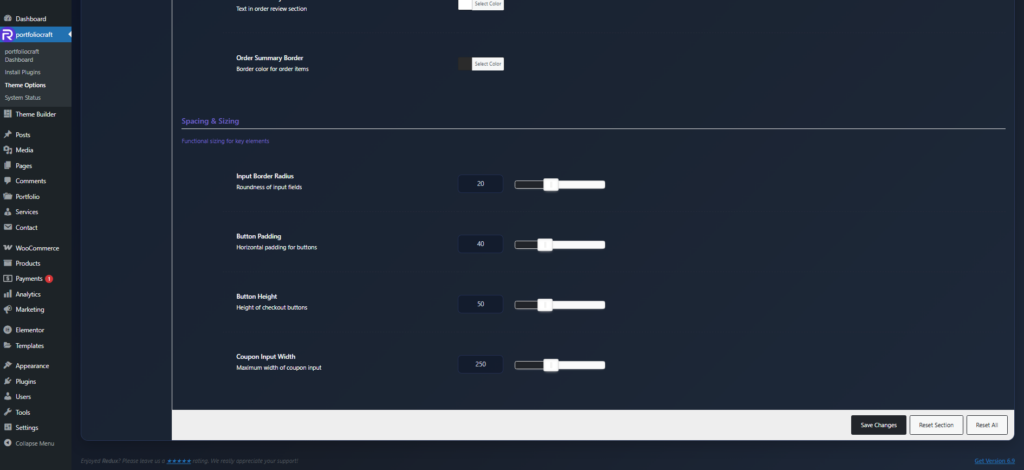
Spacing & sizing #

Fine‑tune usability and consistency.

  • Input Border Radius
    Roundness of input fields’ corners (0 = sharp square, higher values = more rounded). This impacts the overall form style.​
  • Button Padding
    Horizontal inner padding for checkout buttons; more padding makes buttons wider and more prominent.​
  • Button Height
    Vertical size/height of checkout buttons, which affects tap area and visual weight.​​
  • Coupon Input Width
    Maximum width of the coupon input field, useful to keep the layout tidy on large screens.​

These settings together let you build a branded, readable, and conversion‑focused checkout page without writing custom CSS.
Updated on December 20, 2025

What are your Feelings

  • Happy
  • Normal
  • Sad

Share This Article :

  • Facebook
  • X
  • LinkedIn
  • Pinterest
 Cart Page Shop Page

Leave a Comment Cancel Reply

Your email address will not be published. Required fields are marked *

Table of Contents
  • Main colors
  • Form elements
  • Section headers & coupon
  • Buttons & actions
  • Order summary
  • Spacing & sizing

We design modern, performance‑focused WordPress themes that give you full control over your website – from visual identity to conversion‑driven layouts.

Helpful resources

  • Getting Started
  • How to
  • Site Setup
  • Theme Options
  • Theme Builder
  • Demo Import

Need help?

Our support team is here to assist with setup, customization questions, and technical issues. Open a support ticket any time and we’ll get back to you as soon as possible

Contact Us

Copyright © 2025 Rakmyat All Rights Reserved.