
Skip to content

Need Support?

Discover Themes

Need Support?

Discover Themes

Need Support?

Discover Themes

Getting Started

7
  • Theme Updates
  • Installing Required Plugins
  • Install Using FTP
  • Theme Installation & Activation
  • What We Offer (Downloaded Packages)
  • WordPress Installation
  • Server Requirements

Site Setup

4
  • Turn on Coming Soon / Maintenance Mode (Elementor)
  • Adding Coustom 404 Page
  • Customizing Your Menu
  • Adding a Favicon to your Site

Theme Options

9
  • Content Management
  • SEO Management
  • Cache Management
  • Back To Top
  • Typography & Custom Fonts
  • Back To Top (Scroll to Top Button)
  • Cursor / Mouse Movement Animation
  • Change Global Color
  • Enable Dark or Light Mode in Rakmyat Themes

Theme Builder

5
  • Mega Menu 
  • Adding Coustom 404 Page
  • Template Builder
  • Footer 
  • Header Template

Portfolio

4
  • Creating a Single Portfolio Item
  • Creating a Portfolio Archive Page
  • Portfolio Display Name
  • Change Portfolio Slug

Services

4
  • Services Display Name
  •  Creating a Single Service
  •  Creating a Services Archive Page
  • Change Services Slug

How to

5
  • How to Give Access to Your WordPress Website
  • Change Global Color
  • Enable Dark or Light Mode in Rakmyat Themes
  • Adding Coustom 404 Page
  • Turn on Coming Soon / Maintenance Mode (Elementor)

Troubleshooting

5
  • Elementor Not Loading – Troubleshooting Guide
  • Demo Import Failed to Import in WordPress Theme
  • How to Fix the “Critical Error on Your Website”
  • WPML Not Detecting Custom Post Types
  • System Status

Demo Import

4
  • Demo Import Failed to Import in WordPress Theme
  • Manual Demo Import (OCDI + Elementor)
  • Importing Demo Locally from Theme Folder
  • Importing Demo (Default Method via Server HTTP Request)

Full Site Editing

7
  • Adding Coustom 404 Page
  •  Creating a Services Archive Page
  •  Creating a Single Service
  • Creating a Portfolio Archive Page
  • Creating a Single Portfolio Item
  • Footer 
  • Header Template
View Categories
  • Home
  • Docs
  • Theme Options
  • Content Management

Content Management

2 min read

The Content Management → Post Views Counter options let you track how many times content is viewed and optionally hide internal/admin views to keep stats accurate.​


Location and purpose #

  • Location: Rakmyat Dashboard → Theme Options → Content Management → Post Views Counter.
  • Purpose: Enable a built‑in view counter that records and displays how often posts, pages, and custom post types are viewed, with counts visible in the admin columns and optionally on the frontend.​

Enable Post Views Counter #

  • Enable Post Views Counter
    • When enabled, each time a supported post type is visited, its view count is incremented and stored.
    • View counts can be shown in the WordPress admin list (as a “Views” column) and used to highlight popular content on the frontend (for example, “Most viewed posts”).​

Use this to understand which pieces of content attract the most attention and to drive decisions about optimization or promotion.​


Exclude Logged‑in Users #

  • Exclude Logged‑in Users
    • When turned on, views from logged‑in users (including admins and editors) are not counted.
    • This prevents internal activity (content editing, QA checks, admin browsing) from inflating view counts, giving a more accurate picture of real visitor engagement.​

Enable this option on production sites where multiple team members log in regularly.​


Supported Post Types #

  • Supported Post Types
    Check the boxes for the content types you want to track:
    • Posts
    • Pages
    • Portfolio
    • Services
    • Products (WooCommerce)

Only the selected post types will have view tracking active and can display view counts in admin lists and on the frontend
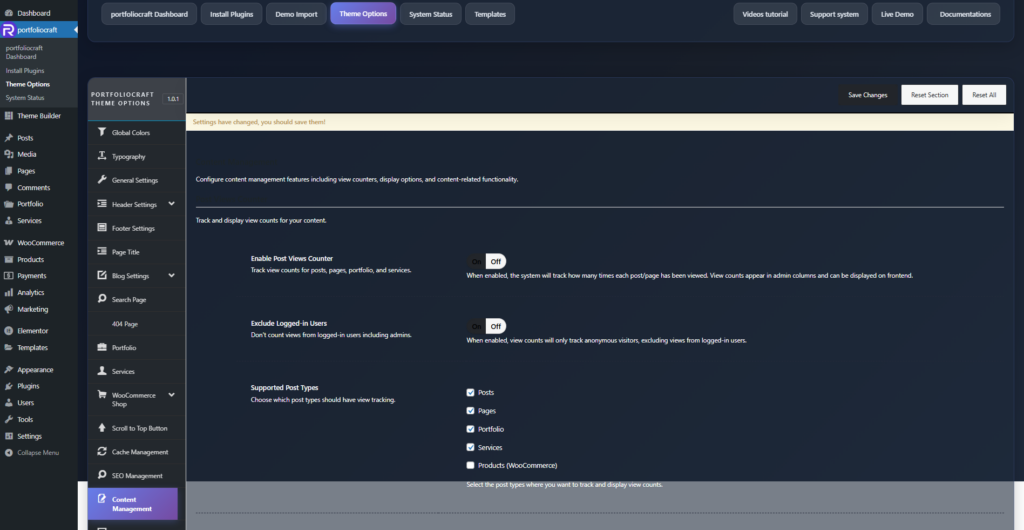
Typical setups:

  • Blogs: enable for Posts (and optionally Pages for key landing pages).
  • Portfolio/agency sites: enable for Portfolio and Services to see which case studies and services perform best.
  • Stores: enable for Products (WooCommerce) to identify popular products by view volume.​

By combining these options, you can run a lightweight, built‑in analytics layer focused on per‑post popularity without needing an external tracking plugin.​

Updated on December 16, 2025

What are your Feelings

  • Happy
  • Normal
  • Sad

Share This Article :

  • Facebook
  • X
  • LinkedIn
  • Pinterest
SEO Management

Leave a Comment Cancel Reply

Your email address will not be published. Required fields are marked *

Table of Contents
  • Location and purpose
  • Enable Post Views Counter
  • Exclude Logged‑in Users
  • Supported Post Types

We design modern, performance‑focused WordPress themes that give you full control over your website – from visual identity to conversion‑driven layouts.

Helpful resources

  • Getting Started
  • How to
  • Site Setup
  • Theme Options
  • Theme Builder
  • Demo Import

Need help?

Our support team is here to assist with setup, customization questions, and technical issues. Open a support ticket any time and we’ll get back to you as soon as possible

Contact Us

Copyright © 2025 Rakmyat All Rights Reserved.