
The SEO Management options in Theme Options provide a built‑in SEO system for meta tags and social sharing, so you can manage titles, descriptions, and robots settings directly from the theme or disable them when using a dedicated SEO plugin.
Location and purpose #
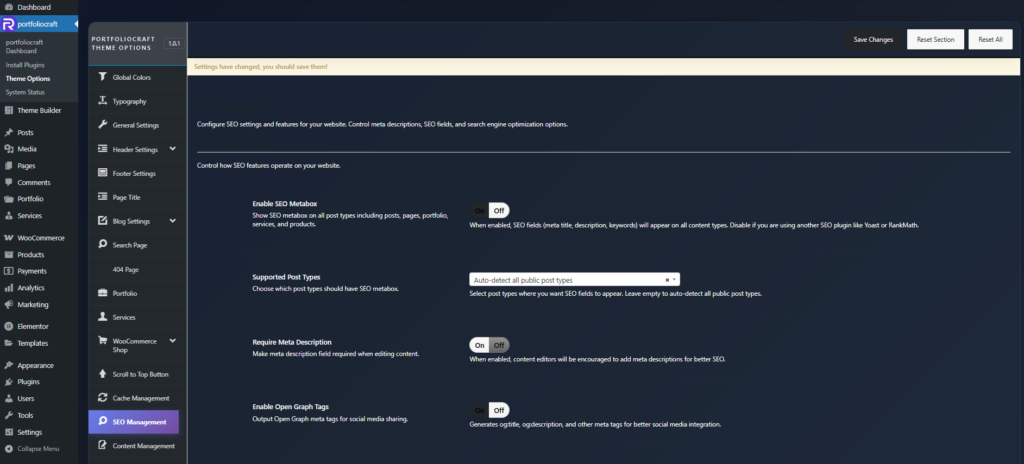
- Location: Rakmyat Dashboard → Theme Options → SEO Management.
- Purpose: Control global SEO behavior (where SEO fields appear, whether Open Graph/Twitter tags are output, and how strict meta descriptions are) and expose an SEO metabox on supported post types.
SEO System Settings (Theme Options) #
Enable SEO Metabox #
- Shows the SEO Settings metabox on all supported post types (posts, pages, portfolio, services, products, etc.).
- Disable this if you are using another SEO plugin such as Yoast, Rank Math, SEOPress, etc., to avoid duplicate meta tags and overlapping interfaces.
Supported Post Types #
- Options:
- Auto-detect all public post types
- Posts only
- Pages only
- Posts, Pages + Custom Post Types
- Choose where the SEO metabox should appear. If left to auto‑detect, it will attach to all public post types registered on the site (useful when working with custom post types like portfolio or services).
Require Meta Description #
- When enabled, the Meta Description field is treated as required during content editing.
- This encourages editors to write descriptions for every important page, which helps click‑through rate and snippet quality in search results (ideal length around 140–160 characters).
Enable Open Graph Tags #
- Outputs Open Graph meta tags such as
og:title,og:description, and optionallyog:imageinto the page<head>. - These tags control how your page appears when shared on platforms like Facebook, LinkedIn, and other social networks.
Enable Twitter Cards #
- Outputs Twitter (X) Card meta tags such as
twitter:title,twitter:description, andtwitter:image. - Ensures your content shows a proper preview when shared on Twitter/X, similar to Open Graph for other platforms
SEO Settings metabox (Edit Post/Page) #
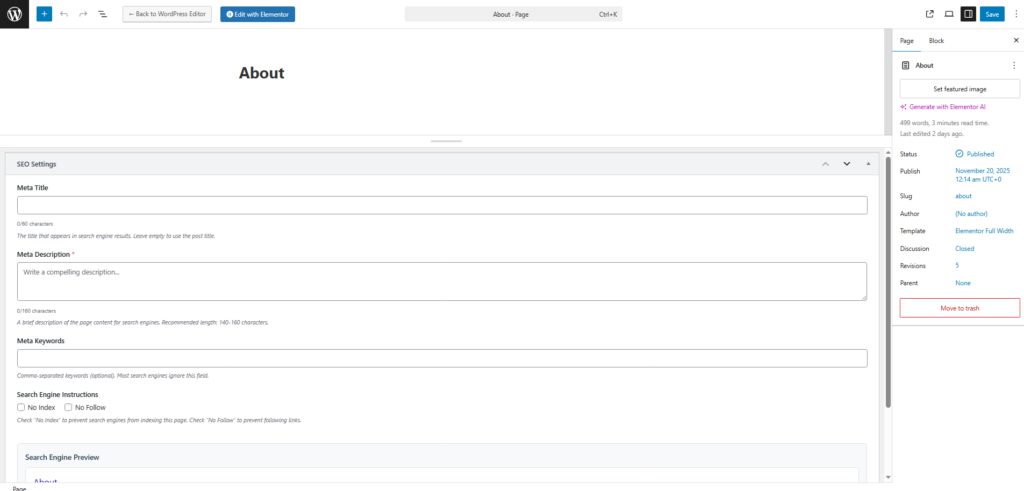
When the SEO system is enabled for a post type, an SEO Settings panel appears in the editor.
Meta Title #
- A custom title tag for search engines, separate from the on‑page heading.
- Recommended length: about 50–60 characters so it does not get truncated in search results.
- If left empty, the theme falls back to the post or page title.
Meta Description #
- Short summary of the page content shown in search snippets.
- Recommended length: roughly 140–160 characters; long enough to describe value but short enough not to be cut off.
- Marked with
*when Require Meta Description is active, reminding editors to fill it for better SEO.
Meta Keywords #
- Comma‑separated keywords.
- Most modern search engines ignore this tag, but it can still be used for internal organization or legacy tools if needed.
Search Engine Instructions (Robots) #
- No Index: Prevents search engines from indexing this specific page (useful for thank‑you pages, internal landing pages, etc.).
- No Follow: Prevents search engines from following links on this page, which can be useful on low‑value or experimental pages.
Search Engine Preview #
- Shows a live preview of how the page might appear in search results:
- Title (using Meta Title or post title).
- URL.
- Meta Description text if set, or a notice prompting you to add one.
- Helps editors visually optimize metadata before publishing.


